
NBA 2K26 Unlocks: Clothes, Animations, Equipment and Badges
Compare the four advertised unlock groups, shared visibility claims and the persistence, item and mode details still worth confirming.
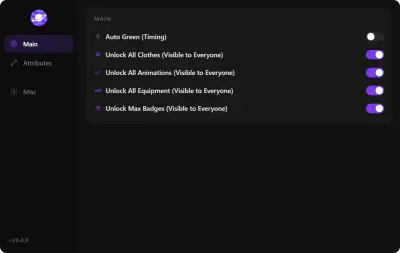
NBA 2K26 HACK lists four unlock groups rather than one explained inventory system. Clothes, animations, equipment and maximum badges are named separately. That structure helps you ask about the exact feature you want. It does not establish that every item, animation or badge level is supported on every player build.
Clothing and equipment are separate options
Unlock All Clothes is the advertised clothing option. Unlock All Equipment is a distinct entry. The listing says both are visible to everyone. This is an advertised shared-visibility claim, rather than a claim that they are merely local cosmetic previews.
The item categories are not documented. If you want a particular piece of clothing or equipment, ask about that item by name. Do not infer ownership, inventory transfer or permanent access from a broad unlock label. The separate Skin Changer guide explains why local previews are a different product concept.
Animation coverage needs an item-level answer
Unlock All Animations is also advertised with shared visibility. The product information does not list animation categories or individual animations. It therefore does not confirm every animation in NBA 2K26, and it does not specify how a chosen animation is applied.
An effective inquiry identifies the animation, game version and intended mode. Ask whether any build restrictions apply and what happens when access ends or the game restarts. Those questions resolve purchase expectations without inventing a persistence rule.
Maximum badges and player builds
Unlock Max Badges is listed separately from clothes, animations and equipment. It relates to the badge progression side of a player build. The information does not describe individual badge effects, levels, build interactions or persistence. The shared-visibility wording attached to the other unlock groups should not be extended into an unsupported badge claim.
Badges also differ from the Attributes Changer, which lists individual statistics. A request about a shooting badge should name the badge; a request about Three Point Shot should name the attribute.
What to confirm before checkout
Ask about the exact item or badge, your player build, intended mode, current game version and whether changes persist. Clarify whether an active session or ongoing access is needed. If the feature you need has not been confirmed, resolve that before purchasing.
The product details summarize the advertised options and Windows requirements. For access conditions and delivery, use the existing support channels and external checkout. Unlock options do not establish account safety or permanent compatibility after patches.