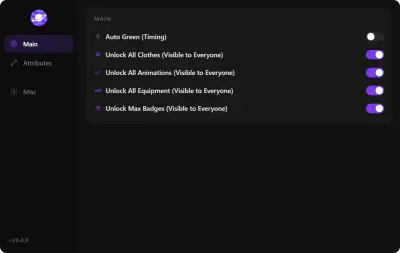
Auto Green
Shooting timing
A timing assistance option built around NBA 2K26 shooting. Confirm supported shot types and activation before purchase.
- Shot-timing assistance
- NBA 2K26 shooting
- Activation to confirm
- No percentage promise
Shooting timing, player attributes and unlock options in one Windows menu. Explore Auto Green, build adjustments and customization before choosing your access.

Timing
Auto Green
6
Attribute groups
4
Config actions
10 / 11
Windows
Features
Explore the documented NBA 2K26 options, from shot timing to player attributes. Each group has a separate purpose.
Shooting timing
A timing assistance option built around NBA 2K26 shooting. Confirm supported shot types and activation before purchase.
Your player build
Access individual options for finishing, shooting, playmaking, defense, rebounding and physical attributes.
Player presentation
The clothing unlock option is advertised as visible to other players. Item coverage and persistence need confirmation.
Movement and style
Explore the advertised animation unlock option. Specific animation categories and mode restrictions are not documented.
Equipment access
A separate equipment unlock option is listed for NBA 2K26. The listing describes results as visible to everyone.
Badge progression
Access the advertised maximum badge unlock option. Build restrictions, badge levels and save behavior require confirmation.
Player information
The menu lists boxes, skeletons, glow, health, distance and team checks. Their basketball-specific behavior still needs confirmation.
Capture settings
Advertised to hide ESP and menus from OBS, Streamlabs and most capture tools. Compatibility depends on your capture setup.
Keep settings organized
Create, load, save and delete configurations through the software menu. The exact settings saved are not specified.
Store
Answers about Auto Green, attributes, unlocks, Windows requirements and separate utilities.
Explore shooting assistance, attribute options and four distinct unlock groups.
Auto Green, player attributes, clothes, animations, equipment and maximum badge options.
A separate panel for disk, MAC, GPU and related identifiers, with a cleaner. NBA 2K26 coverage and any need for this utility require confirmation.
A separate panel for disk, MAC, GPU and related identifiers, with a cleaner. NBA 2K26 coverage and any need for this utility require confirmation.
Single-PC Hyper-V infrastructure. Confirm separate GREENWARD, Static Server and AWS purchases and your supported NBA 2K26 setup.
Single-PC Hyper-V infrastructure. Confirm separate GREENWARD, Static Server and AWS purchases and your supported NBA 2K26 setup.
Local cosmetic previews in supported titles. NBA 2K26 coverage is unconfirmed; this is separate from the main product’s clothing unlocks.
Local cosmetic previews in supported titles. NBA 2K26 coverage is unconfirmed; this is separate from the main product’s clothing unlocks.
Why us
Review documented functionality and check the requirements for your PC. Other providers may offer different options.
Shooting timing
Auto Green is the documented shooting timing option. Ask which shot types your build supports.
Player attribute options
The Attributes Changer groups player statistics by finishing, shooting, playmaking, defense and athletic ability.
Separate unlock groups
Clothes, animations, equipment and maximum badges have their own listed options.
Saved configurations
Create, load, save and delete software configurations from the menu.
Windows requirements
Windows 10 or 11, 8 GB RAM, a dedicated GPU and enabled security settings are listed.
Pre-purchase guidance
Use the existing support channels to confirm build support, Cloud DMA and access terms.
6
Attribute groups
Options span finishing, shooting, playmaking, defense, rebounding and physical attributes.
4
Unlock groups
Clothes, animations, equipment and badges are listed separately.
4
Config actions
Create, load, save and delete configurations.
Setup guide
Check compatibility and dependencies before checkout. Use the current setup instructions for installation.
Check your Windows PC
Confirm the complete setup
Follow the current guide
How it works
Check the complete setup before installing the current supported loader.
4 easy steps
Choose your feature group
Review timing assistance, attribute options and unlocks on the product page.
Check PC and dependencies
Confirm the Windows requirements and whether your supported build needs separate Cloud DMA access.
Use current instructions
Follow the loader guide provided with access. Request help when a step or error is unclear.
Manage your settings
Use Create, Load, Save and Delete Config in the software menu.
Blog
NBA 2K26 feature guides, PC requirements and clear explanations of the separate utilities.
Understand Auto Green, how it differs from shooting attributes, and which activation and shot-type details to confirm before purchase.
A role-by-role guide to finishing, shooting, playmaking, defense, rebounding and physical options, with the limits of the available information.
Compare the four advertised unlock groups, shared visibility claims and the persistence, item and mode details still worth confirming.
FAQ
Answers for this page. The FAQ page holds the rest.